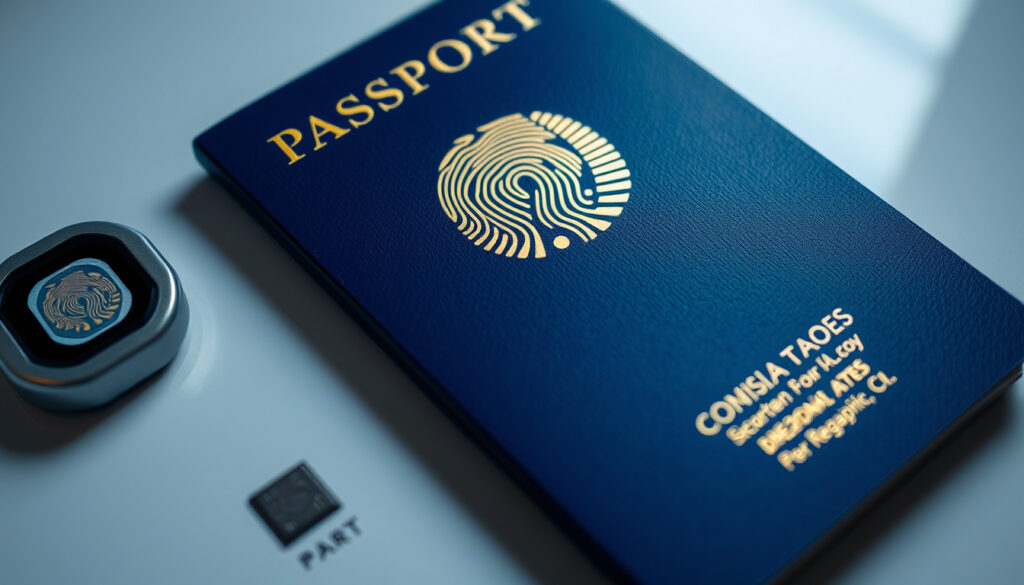
What Is a Biometric Passport? How to Identify and Use It
Handing over your passport at the airport has always felt a bit like handing over a piece of yourself. But with a biometric passport, that’s literally true — a tiny chip on the cover carries your photo and personal details, ready to be read by a machine in seconds. Since 2005, this technology has quietly become the global standard, and if you’ve renewed a UK or Irish passport recently, you’re almost certainly carrying one. This guide will help you spot the chip, understand how it works, and know what to do next.
All UK passports since October 2006 are biometric. — GOV.UK (official guidance)
The e-passport symbol on the cover indicates a biometric passport. — Wikipedia (general article)
Countries issuing biometric passports: Over 150 as of 2024 ·
First biometric passport introduced: Malaysia, 1998 ·
Chip storage capacity: 64 KB to 128 KB ·
ICAO standard established: 2005 (Doc 9303)
Quick snapshot
- All UK passports since October 2006 are biometric (GOV.UK (official guidance)).
- All Irish passports since October 2005 are biometric (Wikipedia (Irish passport)).
- The e-passport symbol on the cover indicates a biometric passport (Wikipedia (general article)).
- Exact number of countries issuing biometric passports is not centrally tracked.
- Some older passports may have a chip but lack the symbol on the cover.
- Whether a passport is truly biometric vs machine-readable may require official verification if the symbol is absent.
- 1998: First biometric passport launched in Malaysia (Wikipedia (full timeline)).
- 2005: ICAO standard published (Doc 9303).
- 2006: UK and Ireland adopt biometric passports.
- More countries expected to phase out non-biometric passports.
- Improved chip security measures like Basic Access Control will become standard.
- Likely further integration with digital travel credentials and mobile wallets (Wikipedia (future developments)).
Five key technical specs capture the shift from a simple booklet to a secure digital token. The chip — just a few millimetres wide — carries enough data to verify your identity at border control in under 10 seconds.
| Feature | Details |
|---|---|
| First biometric passport | Malaysia (1998) |
| ICAO standard | Doc 9303, 2005 |
| Chip technology | RFID contactless, ISO 14443 |
| Typical chip memory | 64-128 KB |
| Common biometrics stored | Digital photo (mandatory); fingerprints (optional) |
| UK adoption date | October 2006 |
| Irish adoption date | October 2005 |
What is a biometric passport?
Definition and core components
- Contains an embedded microchip storing the holder’s biographical data and a digital photograph (Wikipedia (technical definition)).
- Also called an e-passport or electronic passport.
- Optional biometric data: fingerprints or iris scans (Wikipedia (optional data)).
- Complies with ICAO Doc 9303 standards issued in 2005.
- Features a standard symbol on the cover: a rectangle with a circle in the lower half (Wikipedia (symbol description)).
A biometric passport is a passport that has an embedded electronic microprocessor chip. That chip contains biometric information — primarily your digital photograph — that border control readers use to confirm your identity. The chip communicates via RFID (radio-frequency identification), following the ISO 14443 standard. The whole system was designed by the International Civil Aviation Organization (ICAO), a UN agency, and codified in their Doc 9303 standard. The key moment: the chip can only be read when the passport is opened to the data page, and the machine-readable zone at the bottom must be scanned first — a security measure called Basic Access Control.
How the chip stores data
The chip in a biometric passport typically holds between 64 KB and 128 KB of data. The mandatory content is your digital photograph (in JPEG or JPEG2000 format) and the biographical details printed on your passport page: name, date of birth, nationality, passport number, and expiry date. Some countries also store fingerprint data or iris scans as optional biometrics (Wikipedia (chip memory)). The chip is embedded in the passport’s cover or in a polycarbonate page. For UK passports, the chip lives in the polycarbonate page at the start of the booklet, according to GOV.UK (official government documentation). In Irish passports, the chip is in the top-right corner of the booklet (Wikipedia (Irish passport design)).
Security features and ICAO compliance
- Basic Access Control (BAC): the machine-readable zone must be scanned to unlock the chip (Wikipedia (Irish passport security)).
- Active Authentication: prevents cloning of the chip.
- Passive Authentication: lets readers verify that chip data hasn’t been tampered with.
- Extended Access Control (EAC): protects sensitive biometrics like fingerprints (Wikipedia (security features)).
The ICAO Doc 9303 standard defines three layers of security. The first is Basic Access Control — unless a border control reader first scans the machine-readable zone at the bottom of your passport page, the chip won’t respond. The second is Passive Authentication, a digital signature that lets the reader confirm the chip data hasn’t been altered since issuance. The third, Active Authentication, prevents someone from copying the chip data onto a fake chip. Ireland uses Basic Access Control; the UK uses all three layers for its newer passports.
The chip isn’t just a storage upgrade — it’s the foundation of modern border security. For the traveller holding a UK or Irish passport, it means faster automated gates at airports like Heathrow, Dublin, and Schiphol. Without the chip, you’d still need a human officer to manually check your photo against your face. The implication: a biometric passport saves you time every single trip.
How do I know if my passport is biometric?
Follow these steps to determine whether your passport contains a biometric chip:
- Look for the e-passport symbol on the front cover: a rectangle with a circle in the lower half.
- Check the data page for a chip indicator or antenna pattern.
- Compare the issuance date with official country guidance (UK after Oct 2006, Ireland after Oct 2005).
- Use an NFC-enabled phone with a dedicated app to detect the chip.
Look for the e-passport symbol on the front cover
- The easiest visual indicator is the e-passport symbol on the front cover: a rectangle with a circle embedded in the lower half (Wikipedia (symbol description)).
- This symbol is printed on the cover of all genuine biometric passports.
- If you see the symbol, your passport is definitely biometric.
- The chip location differs by country: UK passport chip is in the polycarbonate data page; Irish passport chip is in the top-right corner of the booklet (GOV.UK (chip location)).
Take your passport and look at the front cover. Find the small rectangle icon with a circle at the bottom — that’s the universal e-passport symbol. If it’s there, the passport is biometric. If not, you’ll need to check other indicators. Some older biometric passports from 2005-2006 may not have the symbol printed on the cover — particularly early Irish passports — but they still contain a chip. For those, check the data page for the words “e-passport” or “biometric passport”.
Check the data page for a chip indicator
Open your passport to the page with your photo and personal details. In UK passports, this is the first polycarbonate page — according to GOV.UK (passport page structure), it’s printed on a single polycarbonate sheet with the title page on one side and your data on the other. In Irish passports, the identity page is also printed on a plastic card and it’s the first page of the booklet (Wikipedia (Irish passport design)). On either passport, look for the small chip icon — it might be next to your photo or near the passport number. If you see a gold-coloured antenna pattern around the page, that’s the chip antenna. The chip itself is tiny (about 1-2 mm) and embedded in the card.
Compare with official country guidance
- The UK government states that all passports issued since October 2006 are biometric (GOV.UK (official confirmation)).
- Irish passports have been biometric since October 2005 (Wikipedia (Irish passport timeline)).
- If your passport was issued before these dates, it’s likely not biometric.
- You can also use an NFC-enabled phone with a dedicated app to detect the chip (Wikipedia (detection methods)).
The most reliable way to confirm: check the issuance date. If your UK passport was issued after October 2006, it’s biometric. If your Irish passport was issued after October 2005, it’s biometric. You can also use an NFC phone app such as “E-Passport Reader” or “Passport Check” — hold the phone to the cover or data page, and if the app reads the chip, you’ll see your photo and details displayed. The machine-readable zone at the bottom of the page starts with “P If you’re renewing a passport from the UK or Ireland today, you’re getting a biometric one. The only exception: emergency temporary passports issued at consulates abroad. Those are typically machine-readable only and lack a chip. For a business traveller between London and New York, this matters — biometric passports let you use automated gates at both ends, cutting queue time by 10-15 minutes per border crossing. Yes, all UK passports issued since October 2006 are biometric. The UK government has confirmed that the passport chip is located in the polycarbonate page at the start of the passport — the page that carries your photo and personal details (GOV.UK (chip location)). The chip stores a digital representation of your portrait and your biographical data securely. Older UK passports — the burgundy-covered ones issued before October 2006 — are not biometric. If you’re still holding one of those, you cannot use automated e-gates at UK border control; you’ll need to see an officer. As of 2024, the UK issues only biometric passports. The standard adult passport (valid for 10 years) contains the chip. The UK also issues a blue cover design since 2020, but the biometric features are identical. There is no non-biometric option for standard UK passports issued today. However, emergency travel documents (issued at British consulates) are typically paper-based and do not contain a chip — they are valid only for a single journey and must be surrendered on arrival. Five signs your UK passport is biometric: (1) issued October 2006 or later, (2) the gold e-passport symbol on the front cover, (3) the polycarbonate data page feels like a credit card, not paper, (4) the machine-readable zone starts with “P Yes, all Irish passports issued since October 2005 are biometric. The Irish passport identity page was moved to the front of the booklet and is printed on a plastic card — this was a deliberate design choice to make machine reading easier (Wikipedia (design rationale)). The biometric chip sits in the top-right corner of the booklet, a different location from UK passports. The chip stores the same data: your photo, name, date of birth, passport number, and nationality. Ireland uses Basic Access Control, meaning the machine-readable zone (which starts with “P The Irish government offers two biometric documents. The standard passport book (the familiar booklet) is your full international travel document. The Passport Card — a credit-card-sized plastic card — is designed for travel within the EU and the European Economic Area. Both contain a chip and are biometric. The Passport Card costs €35 (for adults) and is valid for 5 years, but it cannot be used for travel to the UK, United States, or non-EU countries. For a traveller who regularly flies from Dublin to Paris or Amsterdam, the card fits in a wallet and works at all EU automated gates. For travel to the United States, you still need the standard passport book. No, not all passports are biometric yet. But adoption is widespread and accelerating. The European Union made biometric passports mandatory for all member states in 2009. The United States started issuing e-passports in August 2007. Major economies like Australia, Japan, and Singapore all issue biometric passports. However, the United Nations has no binding requirement for all countries to adopt the technology. Countries such as Afghanistan, Yemen, and some small island nations still issue machine-readable passports without chips (Wikipedia (non-adopters)). The implication: if you’re travelling from London or Dublin, your passport is almost certainly biometric, but if you’re a citizen of a country without a biometric passport, you may face longer queues at border control. The fundamental difference is the chip. A machine-readable passport has a printed machine-readable zone at the bottom of the data page — two lines of text and numbers that a scanner can read. That gives the reader your name, passport number, nationality, and expiry date. A biometric passport has all of that, plus a chip that stores a digital version of your photo. That digital photo is what enables automated e-gates at airports: the gate’s camera takes your picture, matches it against the chip’s stored image, and lets you through. Without the chip, the machine can’t confirm your face against a digital reference — so an officer must do the verification manually. The timeline shows how the technology spread. Malaysia was first in 1998, using a chip designed by a local company called IRIS Corporation. Then ICAO created a global standard in 2005 — Doc 9303 — and adoption accelerated rapidly. Ireland was an early European adopter, launching in October 2005, followed by the UK in October 2006. The United States followed in 2007. By 2009, the EU had made it mandatory for all member states. The implication: if you’re under 35 in the UK or Ireland, you’ve probably never held a non-biometric adult passport. For a UK passport holder: if your passport was issued after October 2006, you have a biometric chip — and you’re using e-gates without thinking about it. For an Irish passport holder: the same applies from 2005, and you can also get a wallet-sized Passport Card for EU travel. For any traveller: the older your passport, the more likely it lacks a chip. If yours is pre-2006 for UK or pre-2005 for Ireland, you cannot use e-gates, and you should consider an early renewal. The pattern: early adoption by Malaysia set the stage, but global standardisation in 2005 made biometric passports a reality for most developed nations within a decade. en.wikipedia.org, photoaid.com, youtube.com, yoti.my.site.com Yes, you can continue to travel with a non-biometric machine-readable passport until it expires. However, you cannot use e-gates at border control in the UK, Ireland, the United States, or the EU — you will need to see an immigration officer. The US Visa Waiver Program requires a biometric passport for visa-free entry for UK and Irish travellers. If your passport is non-biometric, you may need a visa. In the UK and Ireland, all standard passports issued since 2006 (UK) and 2005 (Ireland) are biometric. If your current passport is older than those dates, you would need to renew it to get a biometric version. But most travellers will naturally receive a biometric passport when their current passport expires — any standard renewal will give you one. According to GOV.UK (passport renewal guidance), the renewal process is the same whether your old passport was biometric or not. For travellers from the UK and Ireland, yes — the US Visa Waiver Program requires a biometric passport with a digital photograph stored on a chip. The US Customs and Border Protection (via Wikipedia) states that all VWP travellers must have an e-passport that meets ICAO standards. Non-biometric passports from the UK or Ireland will not allow visa-free travel to the US — you would need to apply for a B-1/B-2 visitor visa. If the chip fails, your passport is still a valid travel document — the chip is supplementary, not essential. Border control officers have the equipment to verify your identity manually using the printed data page. However, you will not be able to use automated e-gates. The UK GOV.UK (passport checks guidance) notes that a passport with a non-functional chip remains valid for travel as long as the document itself is not damaged. You should not attempt to remove the chip. Remote reading of a passport chip is extremely difficult in practice. The chip uses Basic Access Control — the machine-readable zone at the bottom of the data page must be scanned first to generate the encryption key needed to read the chip. Without scanning the page, the chip is unreadable. The maximum read range for the RFID chip is about 10 cm (4 inches) with a specialised reader, and much less with a typical phone. Wikipedia (security analysis) confirms that contactless passport chips are designed to be read only with the passport open to the data page. Keep your passport closed in a protective sleeve or wallet. Do not bend the cover, especially near the chip area (top-right corner for Irish passports; the polycarbonate page for UK passports). Avoid storing it near other RFID cards in a way that could cause bending. Do not expose the passport to extreme heat or water. The GOV.UK (basic passport checks) guidance recommends keeping the passport in its original cover and not using non-laminated card slots that could chip the plastic page. In the UK and Ireland, the standard biometric passport only stores your digital photograph — not your fingerprints. Fingerprint data is optional under ICAO standards and some countries (like the US and Germany) collect it for their passport programmes, but it is not stored on UK or Irish e-passport chips. The ICAO (via Wikipedia) specifies that the mandatory biometric is the facial image (digital photograph), while fingerprints and iris scans are optional additional biometrics. In the UK, standard adult passport renewal takes approximately 3 weeks using the online service, though processing times can vary. In Ireland, standard passport renewal takes 5-10 working days for online applications. Both countries charge the same fee for biometric and non-biometric passports (since all standard passports are now biometric). According to GOV.UK (official guidance), there is no separate biometric passport application — you simply apply for a standard passport renewal and receive a biometric document.Are UK passports biometric?
History of UK biometric passports
Current UK passport types
How to identify a UK biometric passport
Is an Irish passport biometric?
Irish passport biometric status
Two types of Irish passports: Passport Book vs Passport Card
Are all passports now biometric?
Global adoption of e-passports
What’s the difference between machine-readable and biometric?
When were biometric passports introduced?
Timeline of early adopters
Frequently asked questions
Can I still travel with an older non-biometric passport?
Do I need to renew my passport to get a biometric one?
Is a biometric passport mandatory for entering the United States?
What happens if the chip in my passport stops working?
Can someone read my passport chip remotely?
How do I protect my passport chip from damage?
Does a biometric passport store my fingerprints?
How long does it take to get a biometric passport in the UK/Ireland?
Related reading
More related posts
 How Do You Get a UTI? Causes, Symptoms & Fast Relief
 BBC Football Live Scores – Free Premier League Updates and Fixtures
 KFC Drive Thru Near Me: How It Works, Menu & the 7-Minute Rule
 Maddox Jolie-Pitt – Biography Family Education Career
 Elton John Real Name: Birth Name, Why He Changed It, and More
 South Africa vs England Match Scorecard: 304/2 by 146 Runs
 Gaming Realms Share Price – Current Levels and Key Metrics
 Midsomer Murders Season 23: Episodes, Cast, Future Seasons
